 BrezLink
Keep shared files easier to find
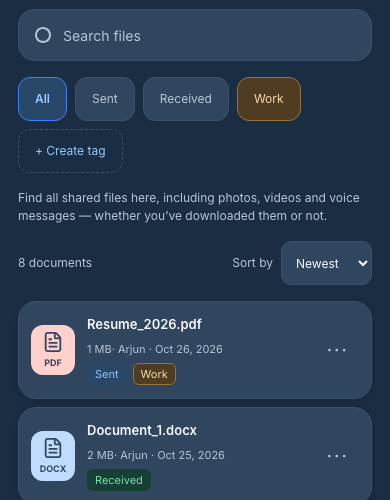
Sign in and open Documents to browse eligible BrezLink attachments available to your account. Search files by a filename fragment, tag text or supported conversation label. Choose All, Sent, Received or one custom tag. Search combines with that single filter; selecting a tag replaces the direction filter. Several tags can be attached to a file, but multi-tag AND/OR filtering and searching inside document contents are not supported.
You can share supported images, documents and voice messages in a BrezLink chat without exchanging phone numbers. The recipient can use their browser; they do not need to install an app just to join the conversation.
Understand your allowance before uploading
Storage, file-size and transfer allowances depend on your current plan and account usage. Check Storage & usage in your account for the limits that apply to you. Documents organizes shared attachments; it does not import WhatsApp, email, Google Drive or your local folders.
Deleting a file can free storage, but it does not restore a consumed lifetime upload allowance. Downloading a received file does not consume your Free Starter upload allowance. Separate download and transfer protections still apply.
Access follows the file’s rules
Documents is not an unrestricted public folder. Files remain subject to account authorization, connection revocation, deletion and plan access rules. Download links expire separately; an expired link does not itself mean the stored file has been deleted. Connection expiry stops messaging but does not automatically erase retained signed-in history. Revocation has stricter history rules. An old entry does not guarantee a working download.
BrezLink does not currently provide end-to-end encryption. Downloaded copies can remain on a recipient’s device after access ends, so share only what you intend the recipient to keep.
Start with a conversation
To send a file to a new contact, first create and share a connection link. If the exchange is for a short task, a temporary chat gives it a visible ending while keeping your phone number private.
Try a fictional tagging example or find a PDF without scrolling. Signed-in users can return to eligible files on another device using the same account; guest browser sessions do not automatically transfer.